Producing a high-quality YouTube video is rarely a one-step process.
You need a topic people want to watch. You need a title and thumbnail that convince viewers to click. Then you need research, a script, narration, footage, music, motion graphics, editing, and a final render.
For creators publishing frequently, this production process can quickly become the main bottleneck.
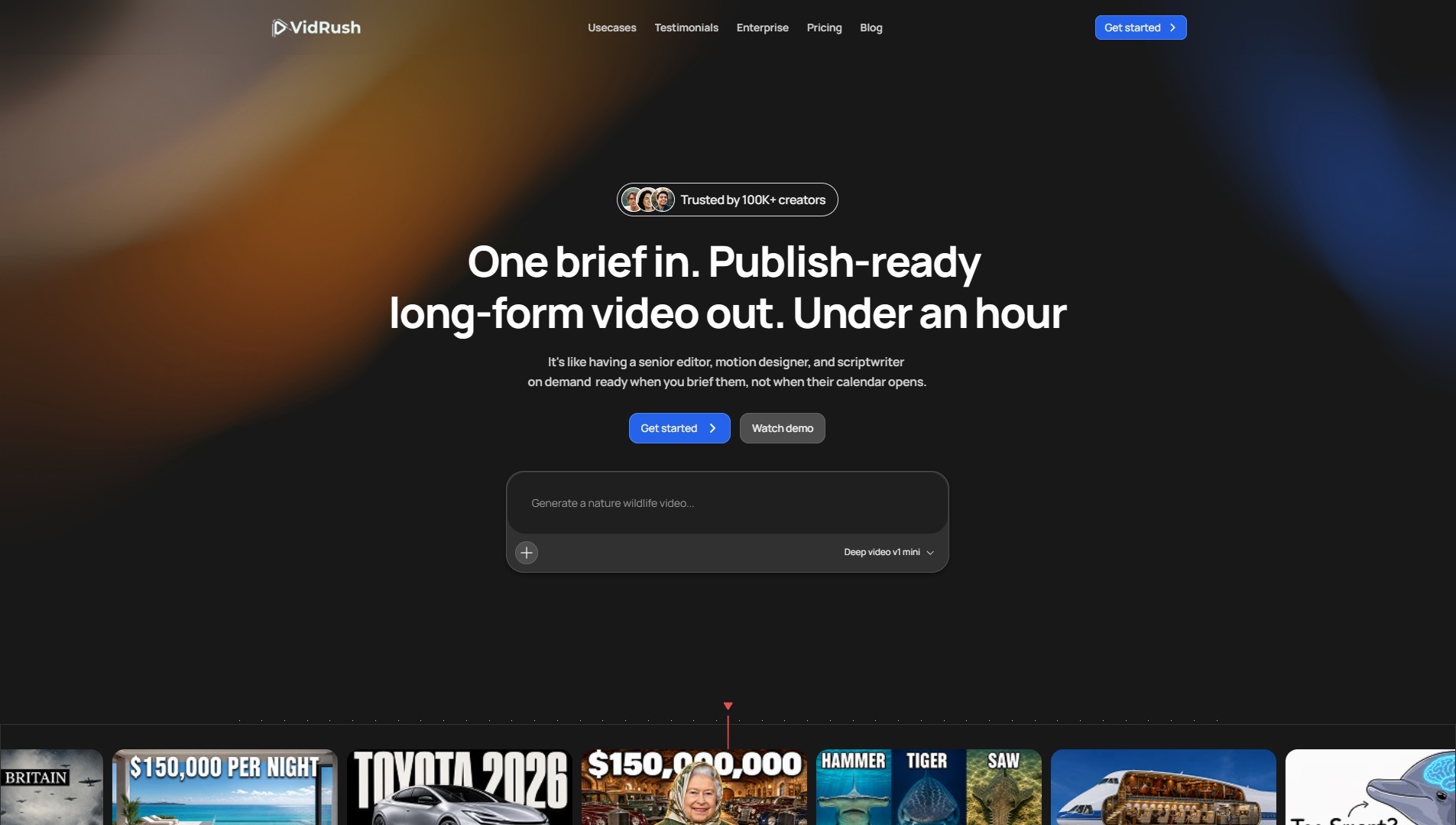
VidRush.ai is designed to automate much of that work.
VidRush is an AI-powered long-form video production platform built for YouTube creators and content businesses. Instead of using separate tools for scripting, voiceovers, finding footage, editing, and rendering, creators can use VidRush to move from an idea or script toward a nearly finished video inside one workflow.
But faster production does not automatically mean more views.
Before deciding where VidRush fits into your YouTube strategy, it is worth understanding what the platform actually does, how much it costs, what users are saying about it, and why video production is only one part of growing a channel.
What Is VidRush.ai?
VidRush.ai is an AI video production platform focused primarily on long-form YouTube videos.
The basic idea is straightforward:
Give VidRush an idea → let it research and write → generate narration → find relevant visuals → edit the video → produce the finished content.
According to VidRush, its system researches, scripts, narrates, and edits videos before matching the narration with relevant real footage sourced from across the web. The company says its output is intended to get creators roughly 80% of the way toward a finished video, with its built-in editor available for the remaining changes.
This makes VidRush particularly relevant to creators producing content such as:
- Documentaries
- History videos
- Finance content
- True crime
- Science and nature
- Geopolitics
- Machines and transportation
- Educational explainers
- Top-10 and list-style videos
VidRush currently focuses on long-form videos of roughly 6 to 40 minutes, according to its website.
Rather than simply generating isolated AI video clips, VidRush attempts to automate much more of the complete YouTube production process.
How Does VidRush Work?
A creator starts with the subject or concept for a video.
VidRush can then handle multiple stages that would normally require several tools or people. Depending on the workflow, this can include research, scriptwriting, AI narration, sourcing relevant images and video footage, motion graphics, music, editing, thumbnail generation, and rendering.
Creators who already have their own scripts can also retain more control instead of depending entirely on AI-written content.
This distinction matters.
A creator may have a specific storytelling style, established scriptwriting process, or carefully researched information. In that situation, the goal may not be to let AI decide what the video says. The creator can instead use automation primarily to reduce the production work that comes after the script.
For creators managing several channels or publishing frequently, removing these production bottlenecks can significantly change how quickly ideas can be tested.
VidRush Generation Models
VidRush currently offers two primary visual models: Deep Video v1 Mini and Deep Video v1 Pro.
The model you select affects both the type of visuals used and the number of credits required to produce the video.
Deep Video v1 Mini
Deep Video v1 Mini is the lower-cost option.
Instead of relying on video B-roll, Mini uses high-quality images sourced from the web and combines them with motion graphics.
VidRush recommends this approach for testing new niches and for subjects where image-driven storytelling works naturally, including history, horror, storytelling, explainers, and similar formats.
The current credit rates are:
| Reasoning | Credits per minute |
|---|---|
| Low | 32 |
| Medium | 40 |
For creators testing many ideas, the lower cost can be useful. You do not necessarily need maximum production value when you are still determining whether viewers are interested in a particular content direction.
Deep Video v1 Pro
Deep Video v1 Pro adds video B-roll to the production.
This makes it better suited to creators who want more movement and a more traditional long-form YouTube editing style.
Current rates are:
| Reasoning | Credits per minute |
|---|---|
| Low | 44 |
| Medium | 55 |
VidRush describes Pro + Medium as its standard configuration for maximum quality and video density.
The company also offers an Experimental reasoning option using its newest research and scripting pipeline. Because it is experimental, VidRush warns that results can sometimes be stronger but also less consistent.
Deep Video V2 is also listed in VidRush's documentation as an upcoming model.
VidRush Pricing
VidRush uses a credit-based subscription system.
The important difference between plans is mainly how much production capacity you receive, along with team seats and the number of videos you can generate concurrently.
According to VidRush's current documentation, its monthly pricing is:
| Plan | Monthly Price | Monthly Credits | Approx. Video Minutes | Concurrent Generations |
|---|---|---|---|---|
| Starter | $99 | 2,000 | ~36 | 1 |
| Creator | $239 | 6,000 | ~110 | 2 |
| Pro | $639 | 18,000 | ~330 | 3 |
| Scale | $1,750 | 50,000 | ~910 | 5 |
| Studio | $4,990 | 150,000 | ~2,730 | 10 |
These minute estimates assume the Pro model with Medium reasoning. Actual usage depends on the model, reasoning level, and length of the videos you generate.
VidRush estimates the effective monthly cost at roughly $1.83 to $2.72 per finished minute, depending on the subscription tier.
Annual billing is priced at the equivalent of 10 monthly payments for 12 months of access. Credits still refresh monthly.
One detail creators should know before subscribing is that unused credits do not roll over into the next billing cycle.
VidRush also offers Pay-As-You-Go credits for creators who temporarily exceed their monthly allocation without wanting to upgrade their subscription.
For the latest pricing before purchasing, check the official VidRush pricing page.
What Does the VidRush Price Actually Cover?
Looking only at the per-minute price can be misleading because VidRush is attempting to replace several stages of production rather than one.
According to its documentation, the generation cost covers processes including:
- Scriptwriting
- Voiceover
- Music licensing
- Stock footage sourcing
- Motion graphics
- Rendering
This is important when comparing VidRush with hiring an editor.
A traditional workflow might involve paying separately for research, writing, voiceovers, footage, editing, thumbnails, and revisions. VidRush packages much of that process into one system.
The value therefore depends heavily on how much of your current workflow VidRush can replace.
A creator who already produces everything efficiently may see less benefit than someone managing several channels and paying multiple editors.
Who Built VidRush?
VidRush is associated with Noah Morris and the VidRush team and operates under VIDRUSH AI STUDIOS LLP, according to the company's website and materials.
Morris is known in the YouTube automation space, and VidRush has been developed specifically around the problems faced by creators attempting to produce long-form content consistently.
The product's positioning reflects that background: it is not marketed primarily as a general-purpose video editor. Its focus is much more directly connected to scalable YouTube content production.
The official website identifies the company as VIDRUSH AI STUDIOS LLP.
VidRush Adoption Claims
VidRush promotes itself as a platform used by a large creator community and showcases channels using VidRush-generated content.
As with any software company's self-reported adoption figures or performance examples, these should be understood as company claims rather than independently audited usage statistics.
This distinction is especially important when evaluating YouTube tools.
A platform can help creators produce videos faster, but that does not mean every video produced with the platform will generate views, subscribers, or revenue.
YouTube performance still depends on factors such as:
- Topic selection
- Audience demand
- Competition
- Title
- Thumbnail
- Viewer retention
- Audience satisfaction
- Channel positioning
- Consistency
VidRush can influence several of these factors, particularly production quality and publishing capacity, but it cannot guarantee demand for the video you decide to create.
What Do Independent VidRush Reviews Say?
Independent customer reviews provide another perspective.
As of August 2026, VidRush has a 4.5/5 TrustScore from 34 reviews on Trustpilot. About 91% of the reviews shown by Trustpilot are five-star reviews, while 6% are one-star reviews.
The sample is still relatively small, so it should not be treated as definitive evidence of how every customer experiences the platform.
However, several patterns appear in the reviews.
Positive reviewers frequently mention:
- Faster video production
- Reduced dependence on editors
- Ability to manage multiple channels
- Good output quality
- Responsive customer support
- Custom-script functionality
- Frequent product improvements
One reviewer said VidRush reduced a process that could take days with a normal editor to a couple of hours. Another described being able to operate multiple channels independently using the platform.
Not every review is positive.
One July 2026 reviewer described VidRush as good but too expensive. Another reviewer complained about repetitive scripts and excessive calls to action. VidRush responded that the calls to action resulted from the supplied prompting and pointed to its custom-script functionality as an option for creators who want exact control.
These criticisms highlight an important point about AI-assisted production: automation can reduce work, but creators should still review the output.
AI-generated scripts, footage selections, pacing, facts, and edits should not automatically be assumed to be ready for publication.
Who Is VidRush Best For?
VidRush makes the most sense when production capacity is the bottleneck.
Suppose you have ten promising video ideas but your team can only produce two videos per week.
Increasing production capacity can have significant value.
VidRush may therefore be particularly useful for:
- Faceless YouTube creators
- Multi-channel operators
- YouTube automation businesses
- Businesses producing educational content
- Documentary-style channels
- Creators testing multiple niches
- Agencies producing YouTube content for clients
The value becomes greater as production volume increases because manually researching footage, creating voiceovers, editing, and rendering every video can consume substantial time.
But there is another bottleneck that automation alone does not solve.
Making Videos Faster Does Not Tell You Which Videos to Make
Imagine two creators.
Creator A produces a beautifully edited 15-minute documentary about a subject almost nobody is interested in.
Creator B finds a topic with strong viewer demand but publishes a poorly structured video with weak visuals and bad pacing.
Neither situation is ideal.
This is why a scalable YouTube workflow needs to solve two separate problems:
What should we make?
and
How should we make it?
VidRush primarily helps with the second problem.
Before production begins, creators still need to identify topics and formats that have a realistic opportunity to attract viewers.
That is where YouTube research becomes important.
Your Title and Thumbnail Are Higher-Leverage Than Most Production Decisions
Creators can spend hours improving transitions, animations, sound effects, and individual edits while overlooking the first thing viewers actually see:
the title and thumbnail.
A viewer cannot appreciate the quality of your video until they click it.
That makes the title and thumbnail some of the highest-leverage elements affecting views.
Suppose VidRush helps you create an excellent documentary.
The research is strong. The narration sounds professional. The footage fits the story. The editing keeps the video moving.
But the title is generic and the thumbnail gives viewers no reason to click.
Much of the production work becomes irrelevant because very few viewers reach the video itself.
This is why production quality should not be optimized in isolation.
A stronger workflow starts before the video is generated:
Demand → Topic → Angle → Title → Thumbnail → Production → Publish → Measure
The production stage matters enormously, but it sits inside a larger system.
Finding Video Ideas With Vernigo
This is where creators can consider Vernigo.
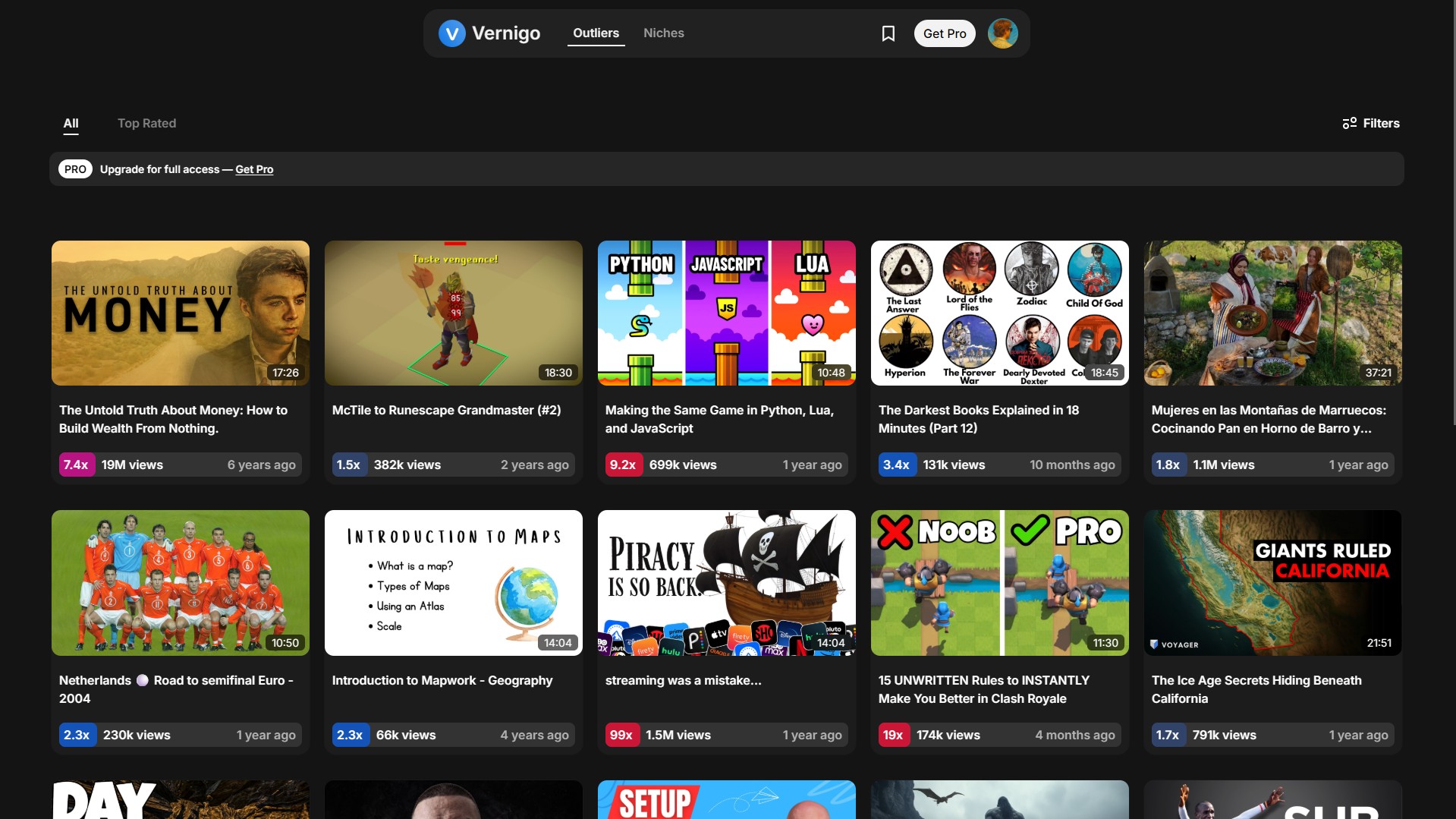
Vernigo is a YouTube research platform that creators and businesses use to discover winning video ideas and identify title and thumbnail formats that are already grabbing attention.
Instead of guessing which subjects might work, creators can study unusual performance across YouTube and use those signals to guide their own content decisions.
One of Vernigo's main features is its Outlier Tool.
An outlier is a video that performs substantially better than what is normal for the channel that published it.
For example, imagine a channel normally receives around 20,000 views per video.
Then one video receives:
600,000 views.
That video achieved roughly 30× the channel's normal performance.
Something about the topic, title, thumbnail, timing, or concept clearly connected with viewers unusually well.
Vernigo helps creators find these outliers.
Creators can then study them to understand:
- What topic was selected?
- How was the idea framed?
- What promise did the title make?
- What did the thumbnail communicate?
- What format was used?
- Could the underlying concept be adapted for another audience?
The goal is not to copy another creator's video.
The goal is to find evidence of unusually strong viewer interest before investing time and money into production.
Finding Unsaturated YouTube Niches
Vernigo also includes a Niche Finder.
The Niche Finder is designed to help creators explore areas where videos are receiving unusually high numbers of views relative to the available supply of content.
That matters because high demand alone does not necessarily create a good opportunity.
A topic may receive millions of searches and views while thousands of established channels compete for the same viewers.
Another niche may have less total demand but dramatically less content being produced for it.
The second opportunity can sometimes be more attractive.
Vernigo's Niche Finder is designed to surface these kinds of underserved opportunities so creators can investigate them further.
Vernigo + VidRush: Research Before Production
This creates a practical workflow for creators using AI to scale YouTube production.
Vernigo helps answer:
What should I make?
Creators use Vernigo to research topics, find outlier videos, explore underserved niches, and study title and thumbnail formats.
Then:
VidRush helps answer:
How do I produce it efficiently?
Once a creator has selected an idea with evidence of demand, VidRush can handle much of the work involved in turning that idea into a finished long-form video.
The workflow becomes:
Vernigo → Find opportunity → Study winning title/thumbnail formats → Select video concept → VidRush → Produce video → Publish → Analyze results → Repeat
The two parts complement each other.
A great video made with VidRush may still fail if there is little demand for the subject or if nobody clicks its title and thumbnail.
On the other hand, identifying an excellent opportunity does not guarantee success either.
A video with strong potential can struggle to get recommended if the content itself fails to satisfy viewers after they click.
Demand gets you into the right market.
The title and thumbnail earn the click.
The video earns the viewer's attention.
A strong YouTube strategy needs all three.
Should You Use VidRush?
VidRush is worth considering if your biggest constraint is the amount of time or money required to produce long-form YouTube videos.
Its strongest proposition is not simply that it uses AI. There are already countless AI writing, voice, image, and video tools.
The more useful proposition is that VidRush brings many production steps into one workflow.
For creators who publish frequently, manage several channels, or want to test more ideas without building a large production team, that can be valuable.
But creators should avoid treating faster production as the entire YouTube strategy.
Before spending credits generating a 20-minute video, ask:
Is there evidence that people want to watch this?
Then ask:
Can I package this idea with a title and thumbnail that will earn attention?
Only then does faster production become truly powerful.
The strongest workflow combines better decisions before production with better execution during production.
That is the role platforms such as Vernigo and VidRush can play together.
Frequently Asked Questions About VidRush.ai
What is VidRush.ai?
VidRush is an AI-powered long-form video production platform designed primarily for YouTube creators. It can automate research, scripting, narration, footage sourcing, motion graphics, editing, and rendering to help creators produce videos faster.
How much does VidRush cost?
VidRush subscriptions currently start at $99 per month for the Starter plan. Higher tiers include Creator at $239/month, Pro at $639/month, Scale at $1,750/month, and Studio at $4,990/month. VidRush estimates an effective production cost of roughly $1.83–$2.72 per finished minute depending on the plan.
Does VidRush use credits?
Yes. VidRush uses credits based on the length of the generated video, the visual model selected, and the reasoning level. Current standard configurations range from 32 credits per minute for Mini + Low to 55 credits per minute for Pro + Medium.
Do unused VidRush credits roll over?
No. According to VidRush's documentation, unused credits expire at the end of the current billing cycle rather than rolling over into the following month.
What is VidRush Deep Video v1 Mini?
Deep Video v1 Mini creates image-driven videos using images sourced from the web together with motion graphics. It does not use normal video B-roll and costs fewer credits than the Pro model.
What is VidRush Deep Video v1 Pro?
Deep Video v1 Pro incorporates video B-roll into the generated content. VidRush currently positions Pro + Medium reasoning as its standard high-quality configuration, costing 55 credits per generated minute.
Can VidRush create complete YouTube videos?
VidRush can automate a large portion of the process, including research, scripts, narration, footage selection, motion graphics, music, editing, thumbnails, and rendering. However, VidRush itself says the system aims to get creators roughly 80% of the way there, with its editor available for final adjustments.
Is VidRush good for faceless YouTube channels?
Faceless and documentary-style channels are among the clearest use cases. VidRush specifically supports formats such as documentaries, educational explainers, history, finance, science, true crime, and Top-10 content.
Does VidRush guarantee YouTube views?
No. A video production tool cannot guarantee views. Results also depend on topic demand, competition, title, thumbnail, audience response, retention, and other factors.
This is why researching video opportunities before production is important.
What is Vernigo?
Vernigo is a YouTube research platform designed to help creators and businesses discover video ideas, outlier videos, promising niches, and title and thumbnail formats.
Its Outlier Tool helps identify videos performing substantially above a channel's normal views, while its Niche Finder helps creators investigate niches where strong viewership may be occurring despite relatively low content supply.
What is the difference between Vernigo and VidRush?
They address different stages of YouTube creation.
Vernigo focuses on deciding what to create. VidRush focuses on producing the video.
A creator can use Vernigo to research opportunities, topics, titles, thumbnails, and niches before using VidRush to turn the selected concept into a long-form video.
Should I research the topic before generating a video with VidRush?
Yes.
Producing more videos is useful only when the videos have a realistic opportunity to attract an audience. Researching demand, competition, outliers, titles, and thumbnails before committing production resources can help creators make more informed decisions.
What matters more: the video or the thumbnail and title?
Both solve different problems.
The title and thumbnail earn the click, making them some of the highest-leverage elements for generating views. The video itself must then keep and satisfy the viewer.
Strong production cannot compensate for a video nobody clicks. Likewise, an excellent title and thumbnail cannot sustain performance if viewers leave because the video does not deliver on the promise.
The strongest strategy therefore combines topic demand, strong packaging, and strong video production.